
Data updated 18 Oct 2026, 09:16 · printed from MedFlow
📖 User manual
1 What MedFlow is
MedFlow – from symptom to treatment, in a single flow – answers two questions:
- What is a medicine used for? Search by brand name or by active substance and read the therapeutic indications from the package leaflet and from the SmPC.
- Which medicines are indicated for a condition? Describe the symptoms or the diagnosis in your own words (“headache and fever”) and get the active substances and medicines whose indications match.
The data come from two official sources:
- ANMDM – the Romanian register of medicines for human use, with the package leaflets and the summaries of product characteristics (SmPC);
- EMA – the medicines authorised centrally in the European Union, with their EPAR documents (human use only).
The indications are extracted automatically from these documents. The application runs in any browser (computer, tablet, phone), with nothing to install; the date of the last update of each source is shown in the sidebar.
2 Interface, language and manual
On the left is the navigation bar: Dashboard, Medicine, Condition (symptoms / diagnosis) and User manual. At the bottom are the update dates of the ANMDM and EMA data and the Dacovire logo. On phones and tablets the menu opens with the ☰ button in the top bar.
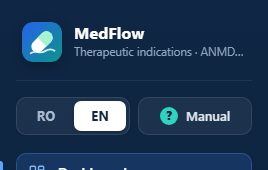
Romanian / English, with a single click
- Press EN (or RO) at the top of the sidebar.
- The same page opens in the other language, with the search and filters kept.
- The choice is remembered: on your next visit the application opens directly in the chosen language.
All the texts of the application are translated: menus, buttons, filters, labels, the Excel / PDF exports. The texts of the leaflets and SmPCs stay in their original language (Romanian), as published; for EMA medicines the approved indication is also shown in English.
The manual
The ? Manual button in the sidebar (and 📖 User manual on the Dashboard) opens this manual, in the interface language. The Print / save as PDF button prints it or saves it as a PDF.
3 Dashboard
The start page: the data at a glance and the two searches.
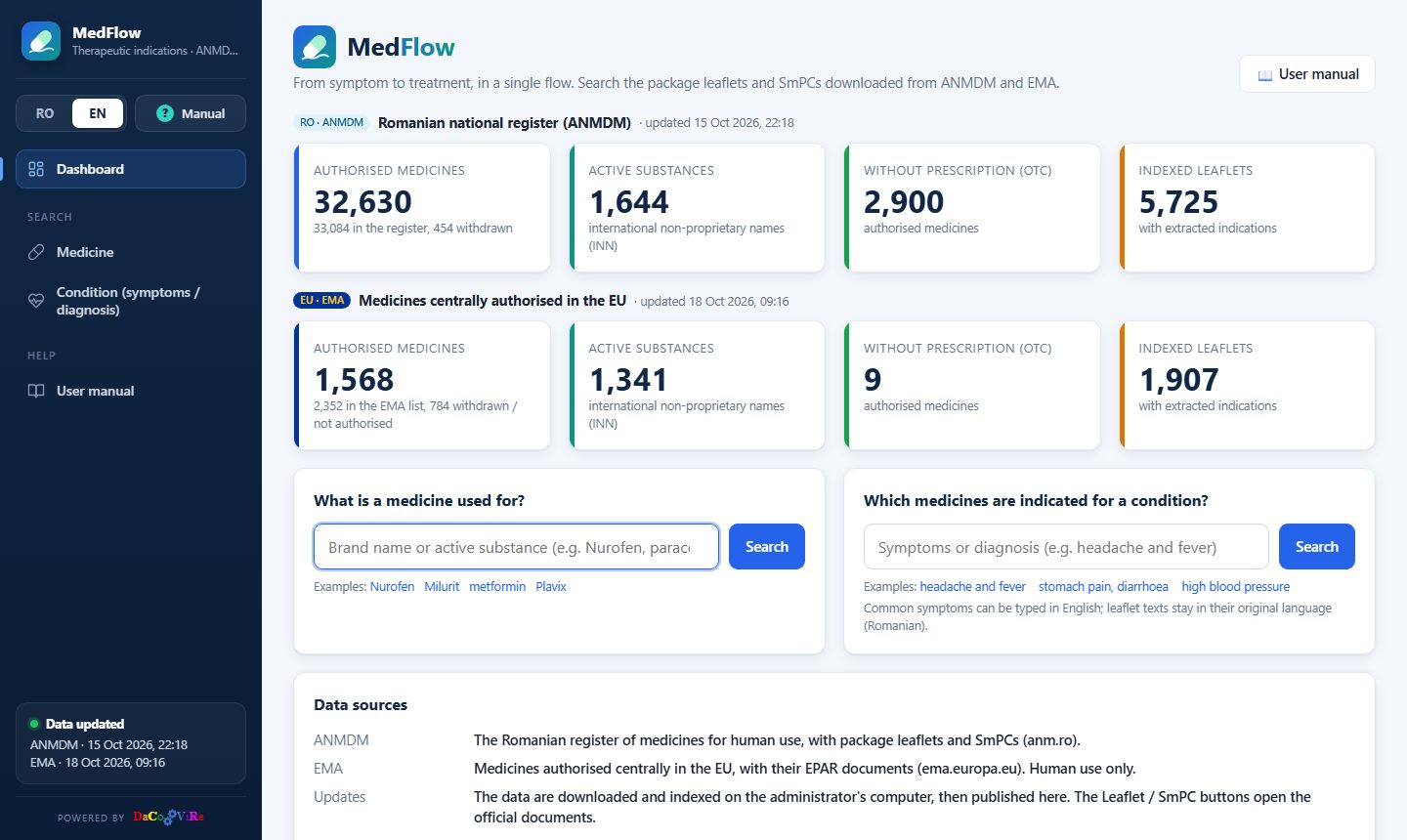
- Indicators, separately for ANMDM and EMA: authorised medicines (and how many were withdrawn), active substances (INN), medicines without prescription (OTC) and indexed leaflets (with the indications extracted). The date of the last update is shown next to each source.
- What is a medicine used for? – the search by medicine, with examples.
- Which medicines are indicated for a condition? – the search by symptoms or diagnosis, with examples.
- Data sources: where the information comes from.
4 Search by medicine
Answers the question “what is this medicine used for?”.
- Type at least 2 letters of the brand name (e.g. Nurofen) or of the active substance (e.g. paracetamol). Diacritics and capitals do not matter; the text can also come from the middle of the name.
- The results appear as you type: first the products whose name starts with the text, then those whose active substance starts with it, then the rest.
- Click a medicine → its details page.
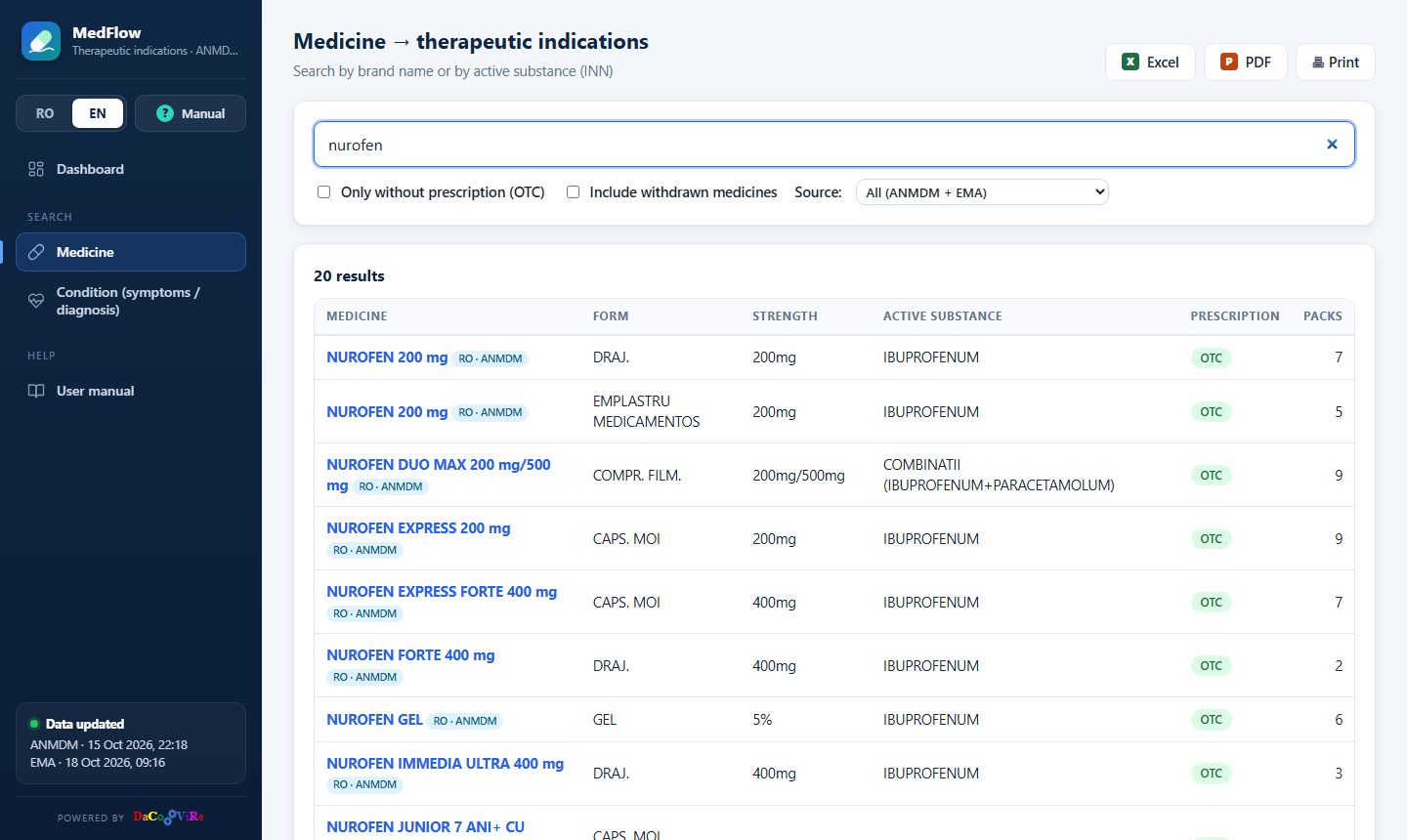
For each product you see the form, strength, active substance, prescription type and the number of packs (CIM codes). At most 500 results are shown; narrow the search if the list is too long.
Filters
- Only without prescription (OTC).
- Include withdrawn medicines – by default only the currently authorised medicines are shown; withdrawn ones appear faded, labelled withdrawn.
- Source: all, ANMDM only or EMA only.
5 Search by condition
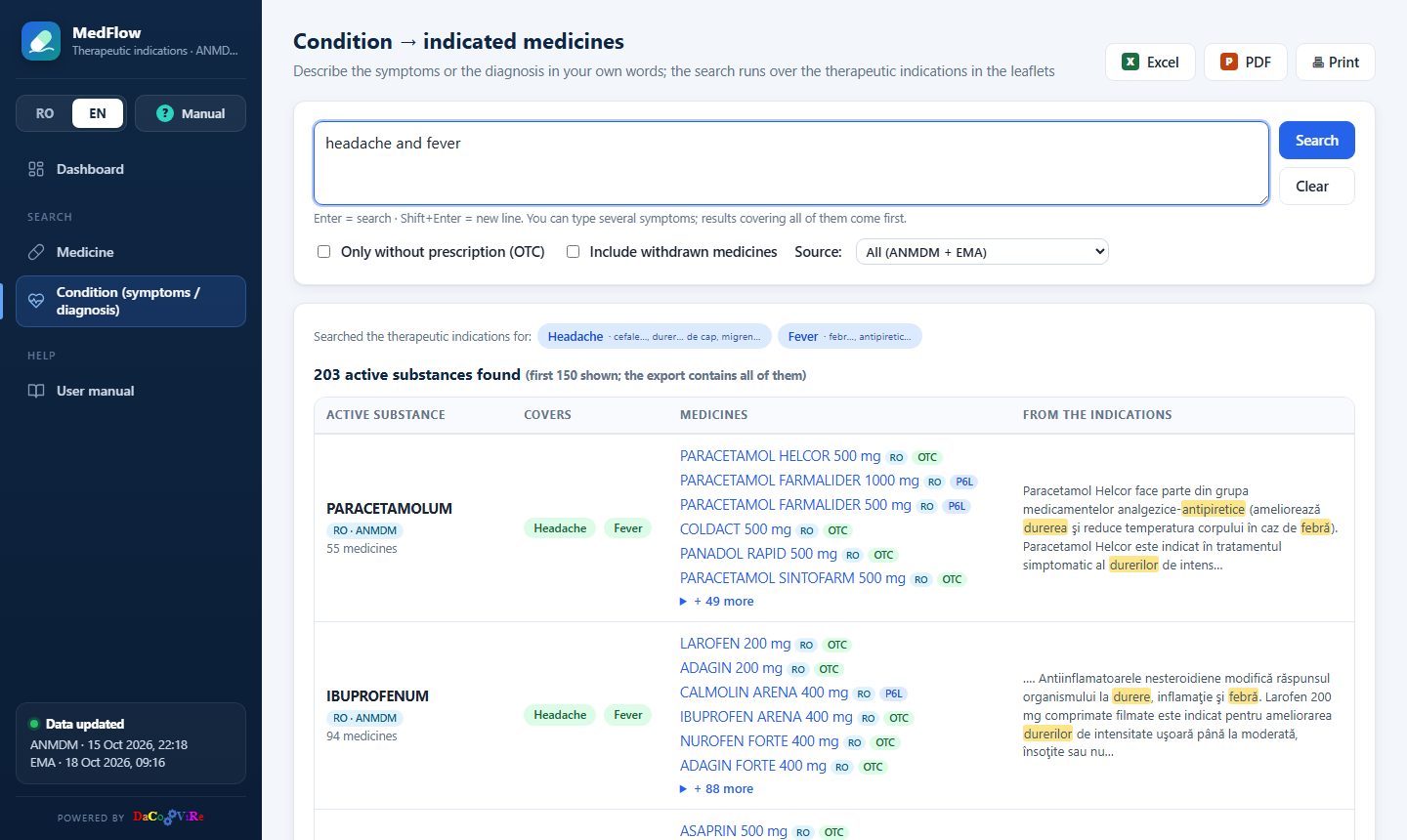
Answers the question “which medicines are indicated for …?”. The search runs over the therapeutic indications in the leaflets and SmPCs (and over the therapeutic action of the medicines).
How to write the search
- Write freely, as you would to a pharmacist: headache and fever, stomach pain, diarrhoea, dry cough. You can also write a diagnosis: high blood pressure, gout, high cholesterol.
- Everyday expressions are translated automatically into medical terms: “head” → cephalalgia, headache, migraine; “tummy” → abdominal pain, colic; “high blood pressure” → arterial hypertension, and so on. The terms are searched in Romanian, the language of the leaflets.
- Common symptoms can be written in English or Romanian.
- Enter starts the search; Shift + Enter adds a new line. Clear empties the search.
- The first search loads the indications of all medicines – a few seconds, with a progress bar; the following searches are instant.
How to read the results
At the top is the interpretation: what was understood from the text. Each recognised concept (e.g. Headache, Fever) shows the first medical terms searched. Unrecognised words appear in grey (e.g. dry) and only break ties between results.
The results are grouped by active substance, in a table with four columns:
- Active substance – with the source and the number of medicines;
- Covers – which symptoms / diagnoses from the search appear in its indications;
- Medicines – the first 6 products (the rest under + … more), with the source and prescription type;
- From the indications – the relevant passage from the leaflet, with the searched terms highlighted.
Order: first the substances that cover the most symptoms, then the most relevant ones (how often and how specifically the terms appear in the indications). At equal relevance the common treatments, with many products on the market, move up. Special forms of a disease that you did not ask for move down (e.g. for “high blood pressure”, pulmonary hypertension).
The first 150 substances are shown; the Excel / PDF export contains all of them. Click a medicine → its details page, with the same terms highlighted in the text. The filters (OTC, withdrawn, source) are the same as for the search by medicine.
6 Medicine details
Opens with a click on a medicine, from any list.
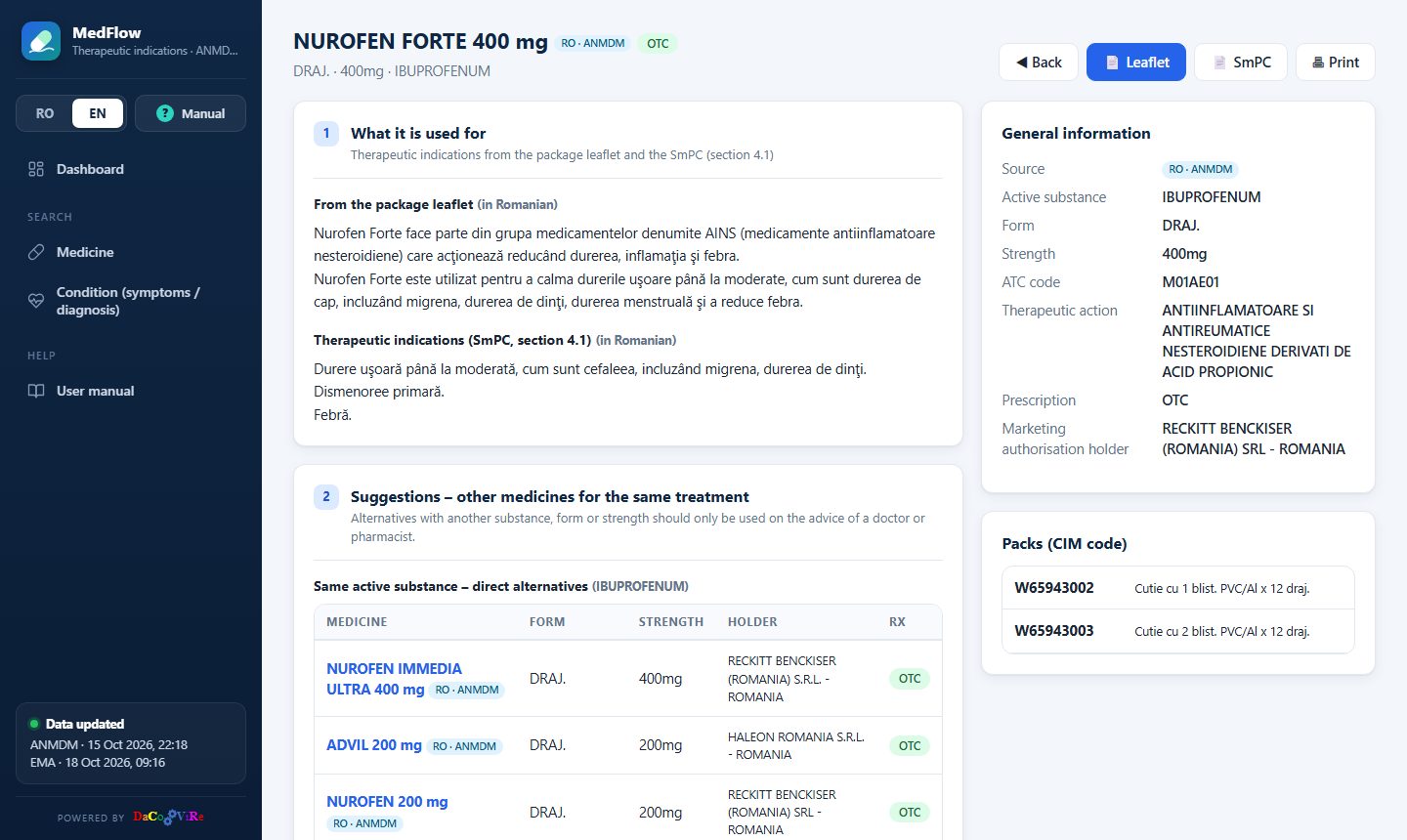
- Header: name, source, prescription type, form, strength and active substance; the 📄 Leaflet and 📄 SmPC buttons open the official documents on the ANMDM website, and 🖶 Print prints the page.
- 1. What it is used for: the indications from the leaflet (“what it is used for”) and from the SmPC (section 4.1 – Therapeutic indications).
- General information: active substance, form, strength, ATC code, therapeutic action, prescription, marketing authorisation holder.
- Packs (CIM code): all the packs of the product; withdrawn ones are faded.
If the indications could not be extracted from the product's leaflet, they are taken from a related product, and the page says so explicitly: from the EMA documents of the same product (for centrally authorised medicines) or from another product with the same active substance (indications may differ for other forms or strengths).
EMA medicines
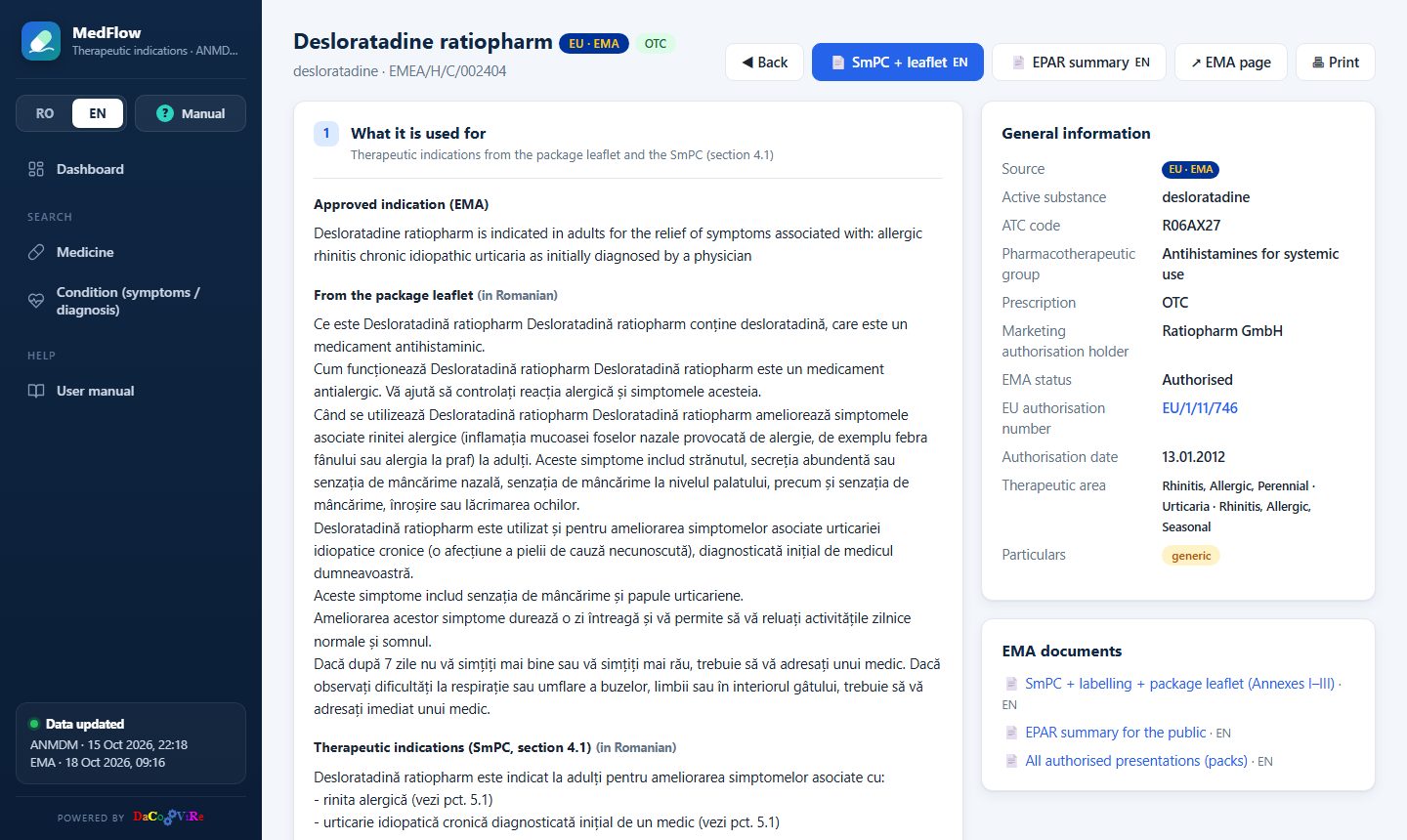
The page of an EMA medicine has the buttons 📄 SmPC + leaflet (Annexes I–III, in English or Romanian), 📄 EPAR summary and ↗ EMA page, and in the general information: the EMA status (authorised, withdrawn, expired…), the EU authorisation number, the authorisation date, the therapeutic area and the special features (orphan medicine, biosimilar, generic, conditional approval, additional monitoring). The approved indication is shown in English. Products from the ANMDM register that are centrally authorised have an EU central authorisation link in their general information, to the EMA page.
Suggestions for the same treatment
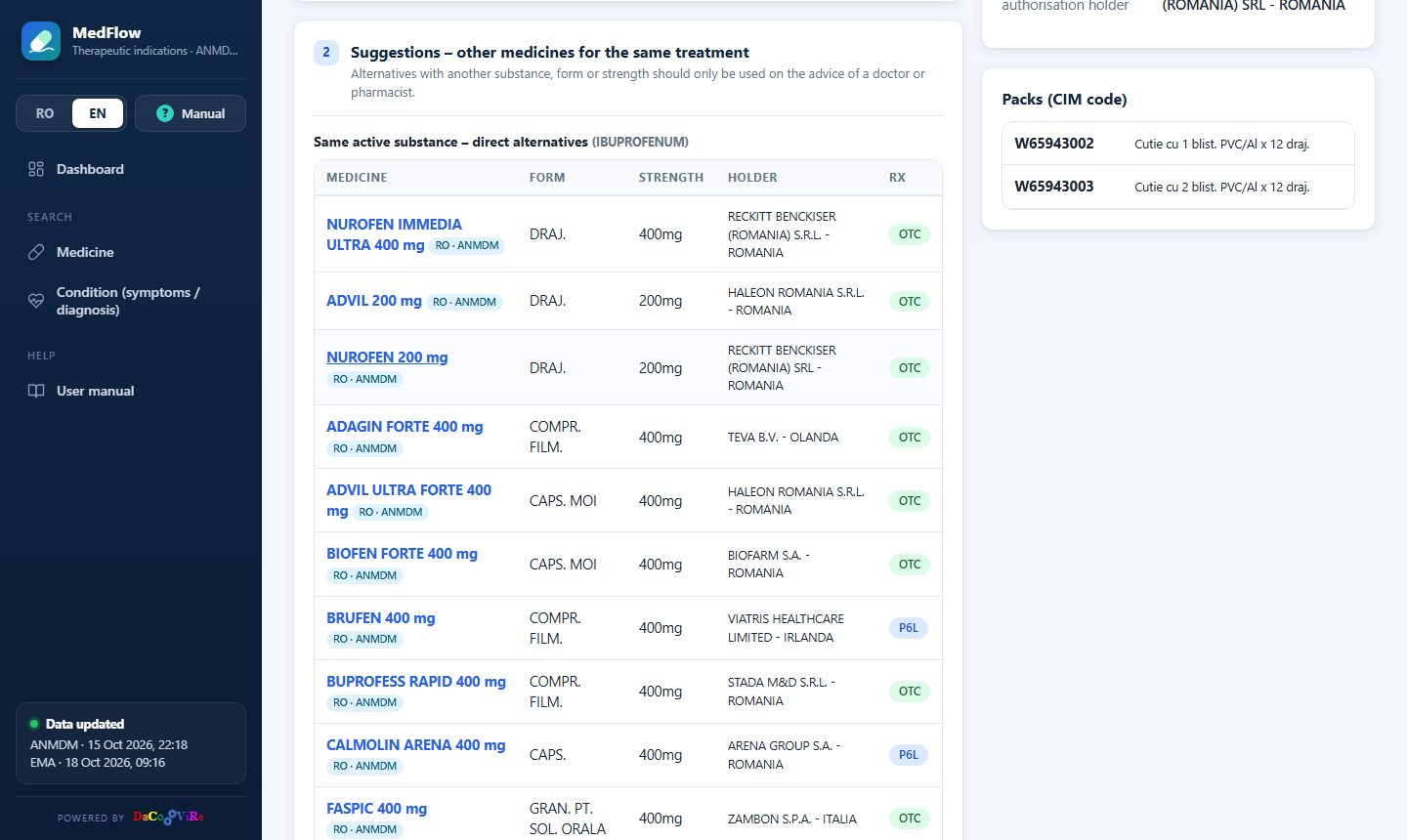
- Same ATC code in the other source: the products from the ANMDM register or from EMA with exactly the same ATC code; the same product (same name) comes first, labelled same product.
- Same active substance – direct alternatives: other brand names with the same substance, those with the same form and strength first.
- Other substances in the same therapeutic class (same ATC group), each with a few products; all → opens the search for that substance.
7 Labels: source, prescription, withdrawn
- RO · ANMDM – product from the Romanian national register; EU · EMA – product authorised centrally in the EU. When the same product (same brand name, same ATC group) exists in both sources, both labels appear. Long lists use the short form: RO EU.
- OTC – without medical prescription; PRF, P6L, PR… – prescription only (see the glossary).
- withdrawn – a medicine that is no longer authorised; shown only with the “Include withdrawn medicines” filter, faded.
8 Excel / PDF export and printing
On the Medicine and Condition pages, after a search, the X Excel, P PDF and 🖶 Print buttons appear:
- Medicine: for each result – source, name, form, strength, active substance, prescription, therapeutic action, therapeutic indications and suggestions for the same treatment.
- Condition: all the substances found (not only the first 150) and all their medicines, with what each one covers and the indications from the leaflet.
The documents have the MedFlow header, the search and filters used and the generation date; the export is in the interface language. The Excel file has filters in the table header. The export libraries load on the first click – an internet connection is needed.
The medicine details page is printed with 🖶 Print; in the print window choose “Save as PDF” for a PDF file.
9 Glossary
- Therapeutic indications
- The diseases or symptoms the medicine is authorised for (leaflet: “what it is used for”; SmPC: section 4.1).
- Package leaflet
- The information for the patient in the medicine's box.
- SmPC (RCP)
- Summary of product characteristics – the official document for doctors and pharmacists.
- EPAR
- European public assessment report (EMA), with the SmPC, labelling and leaflet (Annexes I–III) and a summary for the public.
- INN (DCI)
- International non-proprietary name – the active substance (e.g. ibuprofen), regardless of the manufacturer.
- Brand name
- The name of the product (e.g. Nurofen); one active substance can have many products.
- ATC code
- Anatomical Therapeutic Chemical classification (e.g. M01AE01 = ibuprofen). The first characters give the group: same full code = same substance; same group = same therapeutic class.
- CIM code
- The code of a pack in the ANMDM register.
- OTC
- Medicine supplied without a medical prescription.
- PRF / P-RF
- Prescription that is kept by the pharmacy.
- P6L / P-6L
- Prescription that is not kept by the pharmacy (can be used repeatedly, within 6 months).
- PR
- Restricted prescription (usually treatment started or supervised by a specialist).
- PS
- Special prescription (narcotic, psychotropic substances).
- S
- Restricted use (in healthcare facilities).
- P
- For EMA medicines: medical prescription, without further restrictions specified.
- Central authorisation
- An authorisation valid in all EU countries, issued by the European Commission on the recommendation of EMA.
10 Frequently asked questions
Why can't I find a medicine?
Check the spelling or try the active substance. Tick “Include withdrawn medicines” – it may no longer be authorised. A medicine authorised only centrally in the EU appears with the EMA source.
The search by condition finds nothing.
Try other words or the medical term, or fewer symptoms at once. The interpretation above the results shows what was understood from the text.
Why does a medicine have no indications on its page?
Some leaflets are scanned documents or have an unusual structure, so the text cannot be extracted automatically. Open the leaflet or the SmPC with the buttons on the page.
How often are the data updated?
Regularly, following the data published by ANMDM and EMA. The date of the last update of each source is at the bottom of the sidebar and on the Dashboard.
The Excel / PDF export does not start.
The exports need an internet connection the first time (the export libraries are loaded). Also check that the browser does not block downloads.
Can I use the application on my phone?
Yes – the pages adapt to the screen. You can add the site to your home screen from the browser menu.
In English, why are the indications in Romanian?
The leaflets and SmPCs are the official documents published in Romania; the application does not translate them, so that there are no differences from the official text. For EMA medicines the approved indication is also shown in English.
11 Contact
MedFlow is designed and developed by Dacovire – custom software, built around the way your business works.
- Phone / WhatsApp
- +40 770 864 152
- office@dacovire.ro
- Web
- www.dacovire.ro